
SIR form is used to add new voters and check the existing voters details issued by the ECI from the official website. During the SIR, Booth Level Officers (BLOs) visit houses or people can submit the form online. The main purpose is to make sure the voter list is correct before elections.
How to Fill SIR Form Fill Up Online?
Step 1: Go the official website of ECI https://voters.eci.gov.in
Step 2: At the homepage of the website click on "Fill Enumeration Form" under the "Special Intensive Revision (SIR) 2026"

Step 3: After clicking on that link you have to enter your mobile number which registered on ECI site and captcha code to login. If your mobile number not registered then you have to click on sign up link.

Step 4: Then you have to select the state and enter the EPIC number then click on search button.

Step 5: After that you your prefilled information of the voter will be displayed.
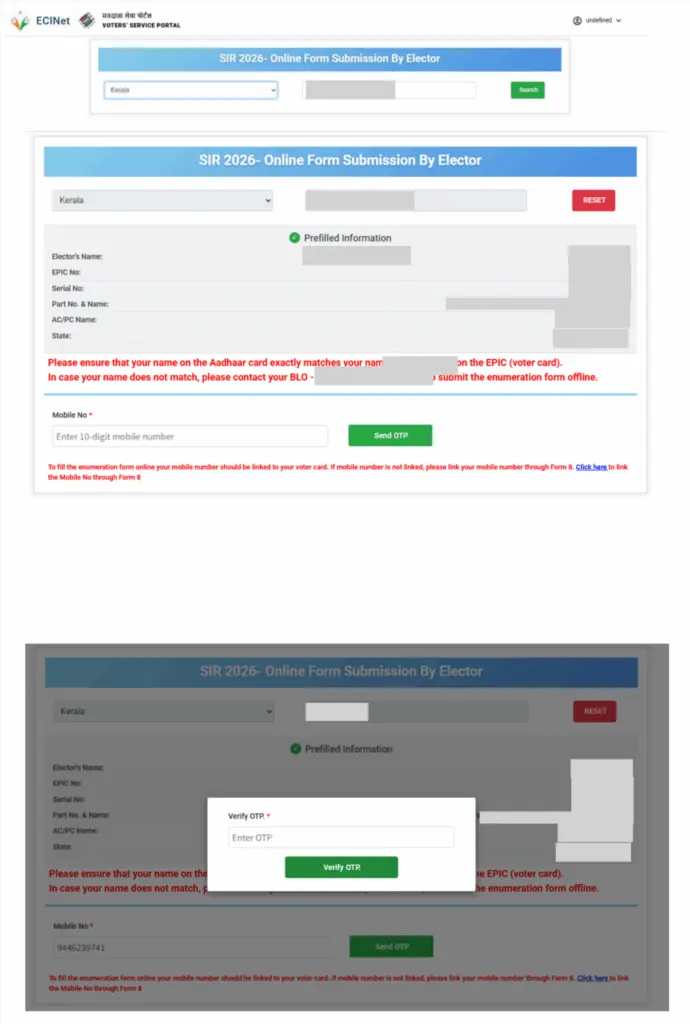
Step 6: CHOOSE CATEGORY
- My Name exists in Electoral Roll of Last SIR
- My Parents name( Father, Mother, Grandfather, Grandmother) exists in the electoral roll of last SIR
- Neither my name nor my parents name exists in the electoral roll.

Step 7: Give Relative details if name not present in Last SIR

Step 8: Now you have to do the Aadhaar verification

How to Fill SIR Form Through BLO?
Step 1: Go the official website of ECI https://voters.eci.gov.in
Step 2: On the homepage of the website you have to click on "Book a Call with BLO"

Step 3: Then you have to enter your mobile number to login. After that you have to enter your EPIC number and click on search button.

Step 4: Now you request has been registered and BLO will reach your home fill the SIR form at your residence.
How to Download SIR Form PDF - Offline Procedure
STEP 1: Visit your nearest state election office and ask for Form 6 or directly download from the link giver below.
STEP 2: Fill the form with personal details, address and date of birth details.
STEP 3: Submit the filled form along with documents.
Documents Required for SIR Form 2026
- If born in India before 01.07.1987:
- Provide any document (for Self) from the list given below that establishes the date of birth and/or place of birth.
- If born in India between 01.07.1987 and 02.12.2004:
- Provide any document (for Self) from the list given below that establishes the date of birth and/or place of birth.
- Provide any document (for Father or Mother) from the list given below that establishes the date of birth and/or place of birth.
- If born in India after 02.12.2004:
- Provide any document (for Self) from the list given below that establishes the date of birth and/or place of birth.
- Provide any document (for Father) from the list given below that establishes the date of birth and/or place of birth.
- Provide any document (for Mother) from the list given below that establishes the date of birth and/or place of birth.
- If any parent is not Indian, provide a copy of his/her valid passport and visa at the time of your birth.
- If born outside of India:
- Attach proof of Birth Registration issued by the Indian Mission abroad.
- If acquired Indian citizenship by Registration/Naturalization:
- Attach the Certificate of Registration of Citizenship.
Contact or Toll Free Number
1950 (Toll-free Number)
SIR Form Applicable in 12 States
At present SIR is ongoing in the following 12 states and union territories and the current SIR form is applicable and available for these only.
| State / Union Territory | Type |
|---|---|
| Andaman & Nicobar Islands | Union Territory |
| Chhattisgarh | State |
| Goa | State |
| Gujarat | State |
| Kerala | State |
| Lakshadweep | Union Territory |
| Madhya Pradesh | State |
| Puducherry | Union Territory |
| Rajasthan | State |
| Tamil Nadu | State |
| Uttar Pradesh | State |
| West Bengal | State |